
Your firewall stopped the attack. Or so you thought.
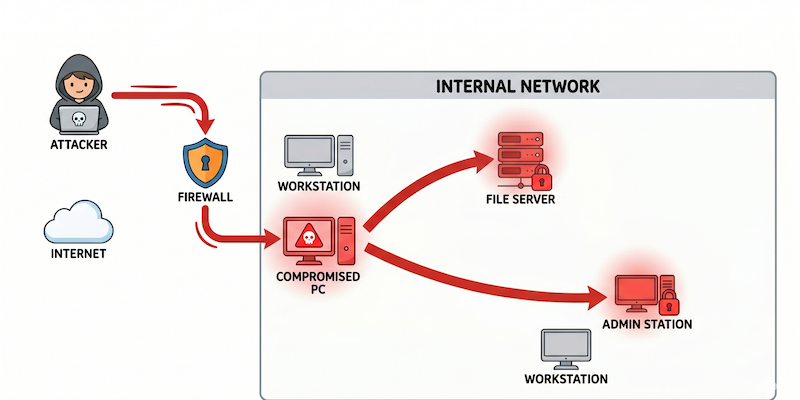
The breach that makes headlines is rarely the firewall being blown apart in a blaze of technical wizardry. More often, an attacker slips in quietly — through a phishing email, a misconfigured VPN, or a weak password on a remote desktop port — and then they wait. They explore. They move sideways.
This is lateral movement. It is the phase of an attack that causes the most damage, and it is the phase that most organisations are completely unprepared to detect or stop.
What Is Lateral Movement?
Lateral movement refers to the techniques an attacker uses after gaining an initial foothold to progressively move through a network — expanding access, escalating privileges, and reaching higher-value systems along the way.
The goal is not just to get in. It is to get to the crown jewels: domain controllers, financial databases, customer records, HR systems, or backup infrastructure. And the path from a standard employee’s compromised laptop to those systems is often far shorter and less protected than most IT teams realise.
“Breaking into a building is hard. But once you are inside and wearing a visitor badge, moving from room to room is surprisingly easy
— especially if internal doors are not locked.”
How Attackers Get Their Initial Foothold
Before lateral movement begins, an attacker needs a way in. The initial compromise does not need to be sophisticated. The most common entry points are:
- A phishing email that harvests credentials or installs a remote access tool
- An exposed RDP or VPN portal with a weak, reused, or previously leaked password
- A vulnerability in an internet-facing application or unpatched network service
- A supplier or contractor’s compromised device with access to your environment
Once inside, the attacker typically has access to one system — usually a standard user’s workstation. From a privileges perspective, this is low. But the internal network stretches out in front of them, and most of it is unguarded from the inside.
Some Most Common Lateral Movement Techniques
Kerberoasting
Active Directory uses Kerberos tickets to authenticate users to services. Any domain user can request a service ticket for any service account. Attackers request tickets for accounts running services — often highly privileged accounts — and attempt to crack them offline at leisure. Service accounts are particularly valuable because they commonly have elevated permissions and passwords that have not been rotated in years.
Credential Dumping
Windows stores credentials in multiple locations: LSASS memory, the SAM database, cached domain credentials, and browser password stores. Attackers systematically extract credentials from each source on every machine they land on. Each new machine often reveals a new set of credentials — and eventually, one of those credentials belongs to an administrator.
SMB and RDP Lateral Movement
With valid credentials or hashes in hand, attackers use standard Windows protocols — Server Message Block (SMB) for file shares and Remote Desktop Protocol (RDP) for remote access — to connect to other machines on the network. From the network’s perspective, this traffic is indistinguishable from legitimate administrative activity. No alarms fire. No alerts trigger.
A Realistic Attack Scenario
Here is how a lateral movement attack typically unfolds in a Singapore SME or mid-market organisation:
- An employee in accounts receivable receives a phishing email and enters their credentials on a convincing but fake Microsoft 365 login page.
- The attacker now holds valid Active Directory credentials for a standard domain user.
- They authenticate to the company VPN using those credentials. The login succeeds — it is a legitimate account.
- From inside the network, they run quiet reconnaissance: mapping shared drives, listing domain users and groups, identifying servers and their roles.
- They discover an older internal server running an unpatched version of Windows Server with a known vulnerability. They exploit it and gain SYSTEM-level privileges on that machine.
- From that server, they dump credentials from memory using a post-exploitation tool. One of the hashes belongs to a domain administrator account that was once used to configure a scheduled task.
- With domain admin credentials, they now have unrestricted access to every system in the organisation — email servers, file shares, HR databases, financial systems, and backups.
Why Traditional Defences Miss Lateral Movement
Most security tools are built for the perimeter. Lateral movement happens entirely inside it.
- Firewalls monitor traffic entering and leaving your network. Internal traffic between workstations and servers typically flows freely across the LAN.
- Antivirus and EDR tools look for known malware signatures or suspicious processes. An attacker using built-in Windows tools and legitimate credentials generates no unusual process activity.
- Patch management addresses software vulnerabilities, but misconfigured Active Directory, over-privileged service accounts, and weak internal segmentation are configuration issues — not software flaws. There is no patch for a service account with a weak password that has Domain Admin membership.
- SIEM alerts can catch lateral movement — but only if the detection rules are tuned for it, which requires knowing what to look for in the first place.
What an Internal Network Penetration Test Actually Finds
An internal network penetration test simulates exactly this attack chain. A pentester starts with the same access level an attacker would have after an initial compromise — a standard domain user account on a network-connected machine — and attempts to escalate privileges, move laterally, and reach critical systems.
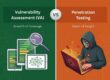
Unlike a vulnerability scan, which produces a list of unverified software flaws, an internal pentest produces something more actionable: a demonstrated attack path. It shows exactly how an attacker would move from your accounts team’s workstation to your domain controller — step by step, with evidence.
“The result is not a list of CVEs.
It is a map of exactly how your organisation would fail under a real attack — so you can fix it before someone else finds it.”
~ ~ ~ ~ ~ ~ ~ ~ ~ ~ ~
Protect what matters. Perennial Consultancy offers CSRO-licensed penetration testing with CREST-certified expert. Ready to find out how secure your Network is? Visit here for more details.
Eligible Singapore SMEs can now get a comprehensive VAPT with up to 70% funding support through the CSA CISO-as-a-Service (CISOaaS) program. Let Perennial guide you through the application.