

For many businesses—cafés, hotels, or even corporate offices—offering free guest Wi-Fi is a standard courtesy. It keeps customers happy and visitors productive. However, if not configured correctly, that “friendly” guest network can act as a digital back door straight into your company’s most sensitive data.
In this post, we’ll explore the dangers of “Guest-to-Internal” pivoting and how a professional Wi-Fi penetration test can identify these gaps before a hacker does.
The Nightmare Scenario: Pivoting to the LAN
The primary risk of public Wi-Fi isn’t just someone stealing the guest bandwidth; it’s Lateral Movement.
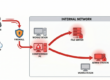
If your guest network and your internal corporate network (where your servers, POS systems, and employee workstations live) are not strictly isolated, an attacker can “pivot.” Once they connect to the public Wi-Fi, they are technically “inside” your perimeter. From there, they can scan your internal infrastructure, attempt to crack weak passwords on local servers, or deploy ransomware across the entire company.
How Hackers Bridge the Gap
During a Wi-Fi penetration test, professionals look for specific weaknesses that allow this jump from public to private:
-
VLAN Leaking: When the “Guest” and “Private” networks are separated by software (VLANs) but the switch or router is misconfigured, allowing traffic to flow between them.
-
Weak Firewall Rules: Sometimes, Guest networks are allowed to access internal printers or local DNS servers. An attacker can exploit these “holes” in the firewall to reach other parts of the network.
-
Evil Twin Attacks: An attacker sets up a fake version of your guest Wi-Fi. When users connect, the attacker captures their credentials or uses the connection to bridge into the physical network.
-
The “Shadow” Network: Employees often get frustrated with slow guest speeds and might bridge the internal network to the guest network using a personal router or bridge device, accidentally creating a bypass.
What Happens During a Wi-Fi Pentest?
A professional assessment goes far beyond just checking the Wi-Fi password. It mimics the steps a real-world attacker would take:
-
Signal Reconnaissance: Mapping the reach of your Wi-Fi. Can someone sit in the parking lot and access your network?
-
Encryption Analysis: Checking if you are using outdated protocols (like WEP or WPA) that can be cracked in minutes.
-
Isolation Testing: This is the big one. The tester connects to the Guest Wi-Fi and tries every trick in the book to “see” or “ping” the internal LAN.
-
Client Attacks: Attempting to intercept traffic from other guests to see if sensitive data is being leaked.
Best Practices for Public Wi-Fi Providers
If your business offers public Wi-Fi, ensure your IT team or provider follows these “Golden Rules”:
-
Complete Physical or Logical Isolation: Use a dedicated firewall interface for guest traffic.
-
Client Isolation: Ensure guests cannot communicate with each other on the network, only with the internet.
-
Captive Portals: Use a login page to track who is on the network and to enforce terms of service.
-
Bandwidth Throttling: Prevent a single user from hogging the connection, which can sometimes be a sign of a Denial of Service (DoS) attack.
Conclusion: Don’t Invite the Wolf In
Free Wi-Fi is a great service, but it shouldn’t come at the cost of your company’s security. By treating your guest network as an “untrusted” zone and regularly testing the barriers between it and your internal data, you can offer convenience without the compromise. Read more here