

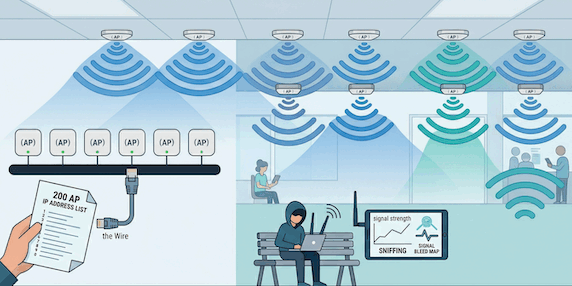
It happens in almost every large-scale wireless rollout. A company installs 200 brand-new, high-performance Access Points (APs). When it comes time for the security audit, they hand the penetration testing team a spreadsheet of 200 IP addresses.
To an IT manager, this feels like a complete scope. To a hacker, this is a massive blind spot.
If you are scoping your “WiFi Pentest” based on a list of IP addresses, you aren’t actually testing your wireless security—you are performing a Network Infrastructure Audit. Here is why that distinction matters for your security.
1. The Two “Faces” of an Access Point
To understand why an IP scan fails as a WiFi test, you have to look at how an AP works. Every Access Point has two completely different “faces”:
-
The Wired Face (Management): This is the physical ethernet port plugged into your switch. It has an IP address. IT teams use this to log in, update firmware, and manage settings.
-
The Wireless Face (The Medium): This is the radio antenna broadcasting your SSIDs (e.g., Company_Corp). This “face” doesn’t have an IP address until a device connects to it. It exists in the airwaves.
The Problem: An IP scanner (like Nessus or Nmap) only talks to the Wired Face. It checks if the “hardware” is patched, but it never actually tests the “Air.”
2. Why the IP Scanner is “Blind” to Wireless Risks
WiFi pentesting is about the 802.11 protocol—the invisible conversation between a device and the antenna. An IP scanner is physically incapable of seeing these critical risks that a real attacker would exploit:
The “Air” Gaps Table
| The Wireless Risk | Can an IP Scanner find it? | Why an IP Scanner misses it: |
| Credential Sniffing | NO | Attackers grab “Handshakes” from the air to crack passwords offline. |
| Sensitive Endpoint Exposure | NO | You must be connected to the WiFi to see if internal login pages or APIs are visible to unauthorized users. |
| Captive Portal Bypass | NO | Bypassing a Guest login page requires interacting with the web redirect over WiFi. |
| Network Segmentation | NO | You must be on the WiFi to see if the “Guest” network can talk to the “Finance” network. |
| Peer-to-Peer Isolation | NO | This prevents two users on the same WiFi from attacking each other. An IP scanner cannot test this. |
| Evil Twin / Rogue APs | NO | An attacker can set up a fake AP. Since it’s not your hardware, it has no IP on your list. |
Read more on the top critical risks of WiFi here .
3. The Correct Way: SSID-Based Testing
A true WiFi Penetration Test is SSID-based, not IP-based. Instead of a list of 200 IPs, a professional tester needs:
-
What are your SSIDs? (e.g., Corp-Internal, Guest, IoT)
-
What is the physical footprint? (Which floors or buildings need coverage?)
-
What is the Auth method? (Are you using Pre-Shared Keys or 802.1X?)
Conclusion: Don’t Audit the Bracket, Test the Lens
Scanning the IP of an Access Point is like checking if a security camera is bolted tightly to the wall. It’s important, but it doesn’t tell you if the camera is actually recording or if the lens is covered in tape.
If you have 200 APs, don’t just scan their IPs. Get out into the airwaves and test the SSIDs. That is where the real entry point lies.
~ ~ ~ ~ ~ ~ ~ ~ ~ ~ ~
Protect what matters. Perennial Consultancy offers CSRO-licensed penetration testing with CREST-certified expert. Ready to find out how secure your WiFi Network is? Visit https://perennialconsultancy.com/pentest for more details.